> ## Documentation Index
> Fetch the complete documentation index at: https://docs.lokiproxy.com/llms.txt
> Use this file to discover all available pages before exploring further.

# 如何使用不限量住宅代理？

在配置不限量住宅代理之前請先確認您已經添加了白名單IP或子用戶。不限量住宅代理目前不支持選擇國家/地區，因此以下步驟不包含此項。

## 通過API訪問代理

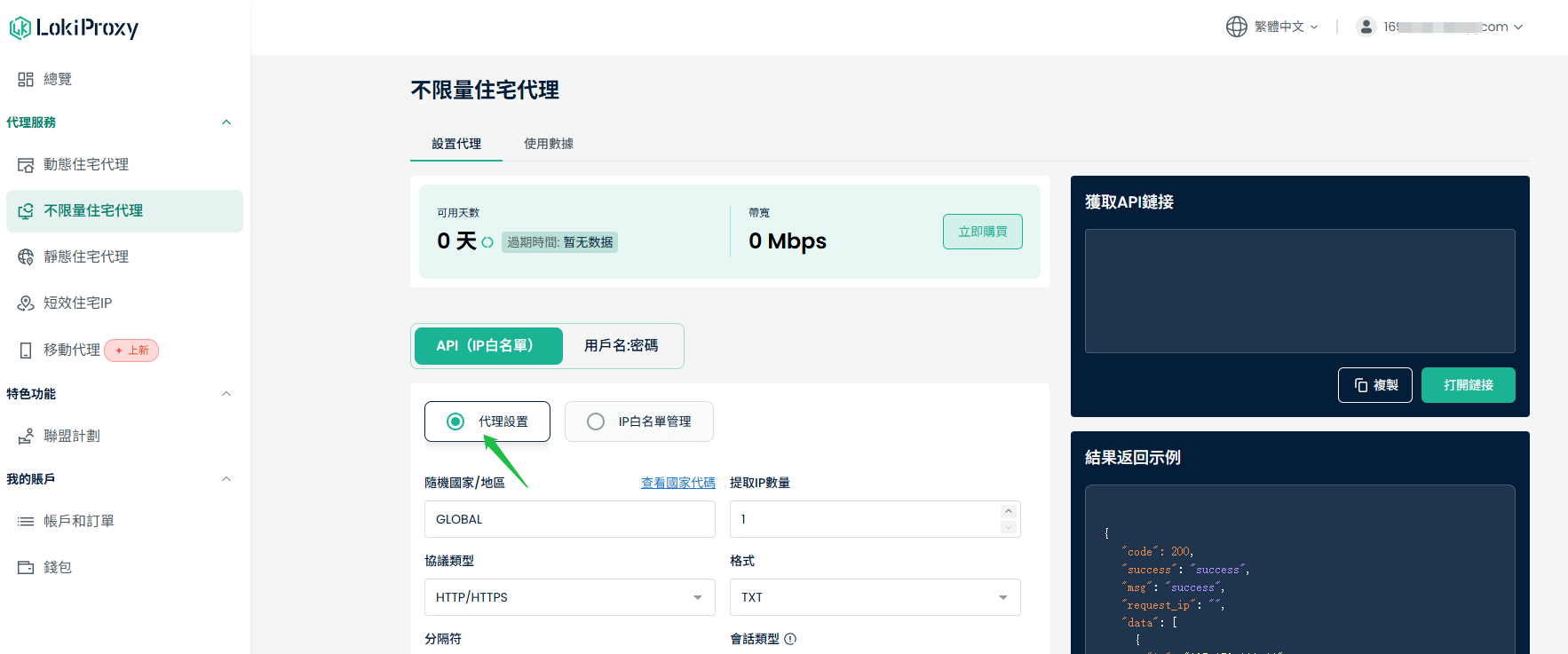
①點擊“代理服務”，選擇“不限量住宅代理”

②選擇“API（IP白名單)”，點擊“代理設置”

<Frame>
  <img src="https://mintcdn.com/lokiproxy/XtsN5yTsjSzE6BcM/images/%E4%BC%81%E4%B8%9A%E5%BE%AE%E4%BF%A1%E6%88%AA%E5%9B%BE_17822950347739.png?fit=max&auto=format&n=XtsN5yTsjSzE6BcM&q=85&s=8aad0ba6b3883fa687618ec6f7a89290" alt="企业微信截图 17822950347739" width="1766" height="737" data-path="images/企业微信截图_17822950347739.png" />
</Frame>

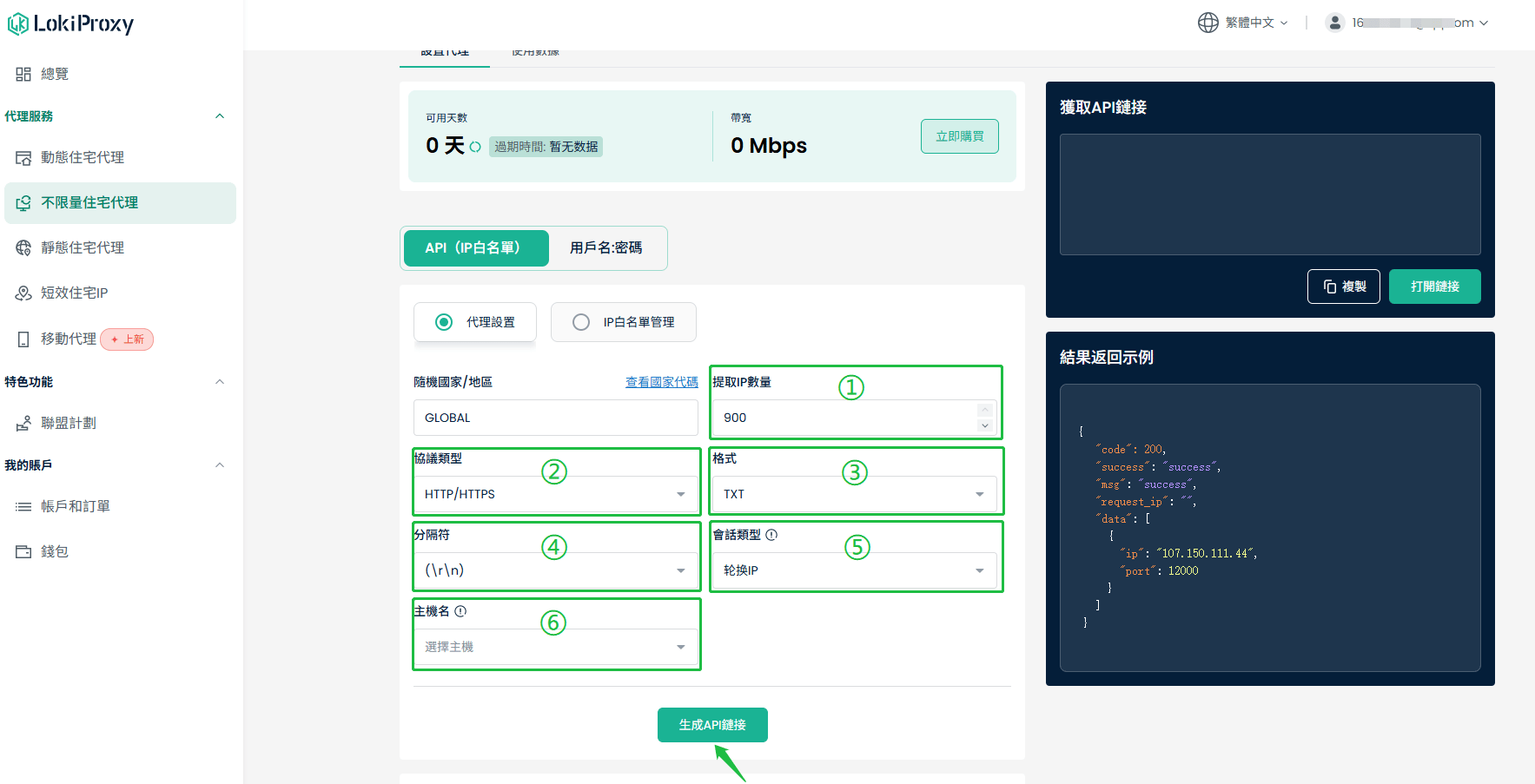
③輸入需要提取的IP數量，最多可輸入900

④按需選擇“協議類型”“格式”“分隔符”“會話類型”

⑤選擇主機。爲保證最佳連接，請根據您的網絡IP地址選擇就近的服務器。

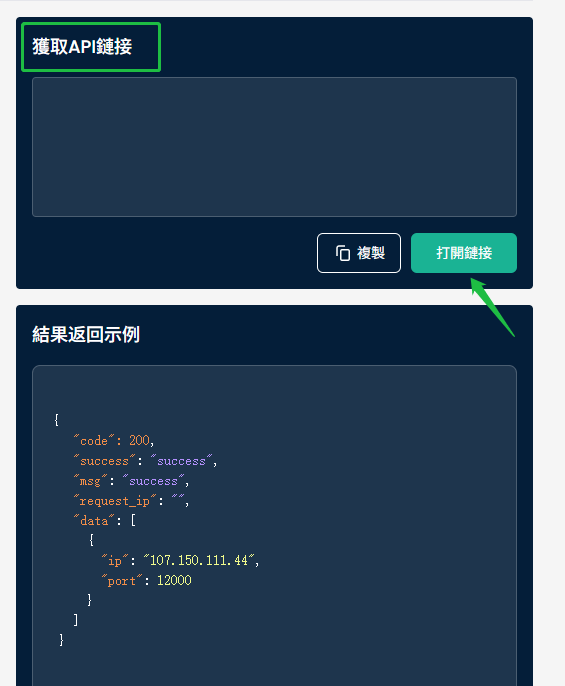
⑥點擊“生成API鏈接”即可在右側“獲取API鏈接”中顯示
<Frame>
  <img src="https://mintcdn.com/lokiproxy/XtsN5yTsjSzE6BcM/images/2-7.png?fit=max&auto=format&n=XtsN5yTsjSzE6BcM&q=85&s=de61bd505731433fab00680ad2838020" alt="2 7" width="1767" height="903" data-path="images/2-7.png" />
</Frame>

⑦點擊“打開鏈接”便能看到可用的代理列表

<Frame>
  <img src="https://mintcdn.com/lokiproxy/XtsN5yTsjSzE6BcM/images/3-5.png?fit=max&auto=format&n=XtsN5yTsjSzE6BcM&q=85&s=bc9d6eb4ab063742d2cb2aa0631f65b3" alt="3 5" width="565" height="686" data-path="images/3-5.png" />
</Frame>

## 通過用戶名/密碼訪問代理

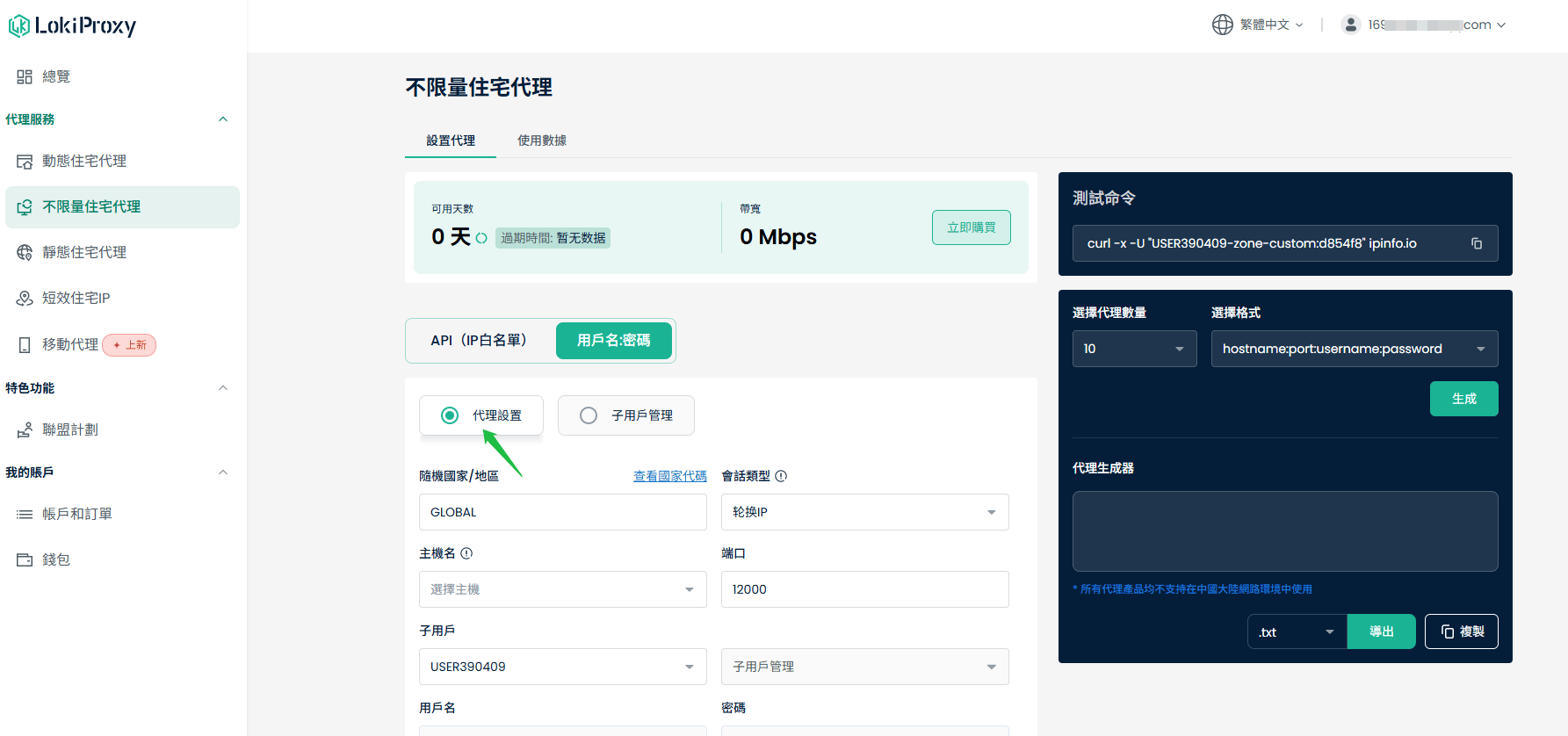
①點擊“代理服務”，選擇“不限量住宅代理”

②選擇“用戶名:密碼”，點擊“代理設置”

<Frame>
  <img src="https://mintcdn.com/lokiproxy/XtsN5yTsjSzE6BcM/images/4-4.png?fit=max&auto=format&n=XtsN5yTsjSzE6BcM&q=85&s=6a60b03900420077b0244d26ec9c014d" alt="4 4" width="1785" height="838" data-path="images/4-4.png" />
</Frame>

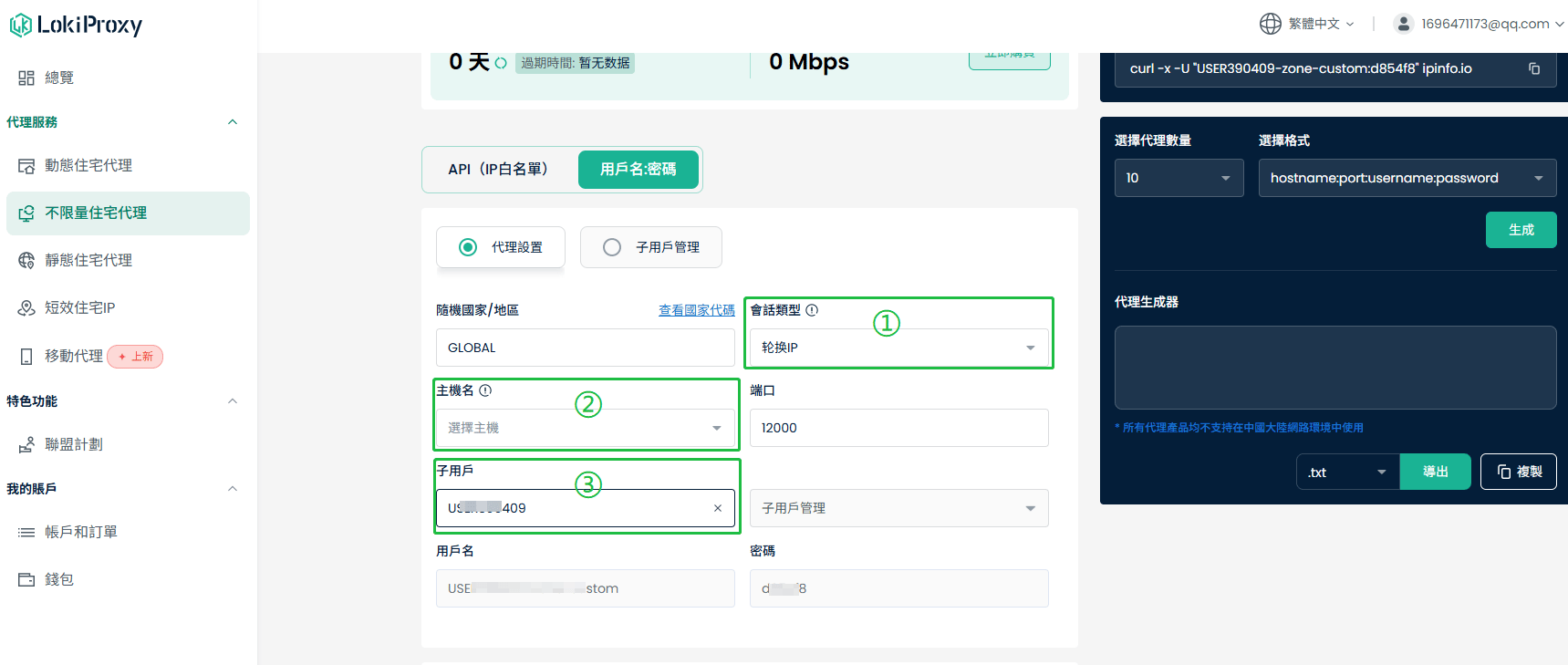
③選擇“會話類型”。選擇“輪換IP”會根據每次請求輪換IP，選擇“粘性IP”可設置IP持續時間。

④選擇主機。爲保證最佳連接，請根據您的網絡IP地址選擇就近的服務器。

⑤選擇需要訪問代理的“子用戶”。

<Frame>
  <img src="https://mintcdn.com/lokiproxy/XtsN5yTsjSzE6BcM/images/5-5.png?fit=max&auto=format&n=XtsN5yTsjSzE6BcM&q=85&s=3ed0348cd82ddd6e26d72ad3f033ab14" alt="5 5" width="1719" height="729" data-path="images/5-5.png" />
</Frame>

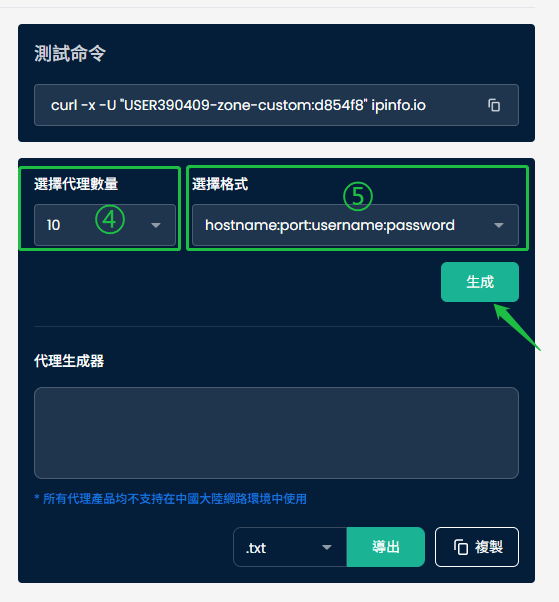
⑥儀表板右側選擇代理數量和格式，點擊“生成”即可在“代理生成器”中獲得可用的代理列表。

<Frame>
  <img src="https://mintcdn.com/lokiproxy/XtsN5yTsjSzE6BcM/images/6-3.png?fit=max&auto=format&n=XtsN5yTsjSzE6BcM&q=85&s=cbc7dd3af4bbdb75a60122634d8cea9c" alt="6 3" width="559" height="602" data-path="images/6-3.png" />
</Frame>